

Summarize in
As a property owner or manager, you're likely familiar with platforms like Airbnb and Vrbo, but have you considered tapping into the potential of Google Vacation Rentals?
This powerful platform can significantly boost your property's exposure and bookings. In this comprehensive guide, we'll walk you through everything you need to know about getting your property listed on Google Vacation Rentals.
- Understanding Google Vacation Rentals
- Eligibility criteria for listing on Google Vacation Rentals
- Preparing your property for listing
- Choosing a Google-approved connectivity partner
- Step-by-step guide to listing your property on Google Vacation Rentals
- optimizing your Google Vacation Rental listing
- Managing bookings and guest communication
- Conclusion
Quick tip: You can't list your property directly on Google Vacation Rentals manually. Unless you manage over 5,000 properties, Google requires you to use a certified Connectivity Partner (a channel manager or Property Management System) to push your listing, calendar, and pricing into their search results.
Understanding Google Vacation Rentals
Google Vacation Rentals is a feature integrated within Google Search and Maps, allowing travellers to find and book holiday accommodations directly through Google's familiar interface. When users search for vacation rentals in a specific location, Google displays a grid of available properties, complete with photos, pricing, and key details.
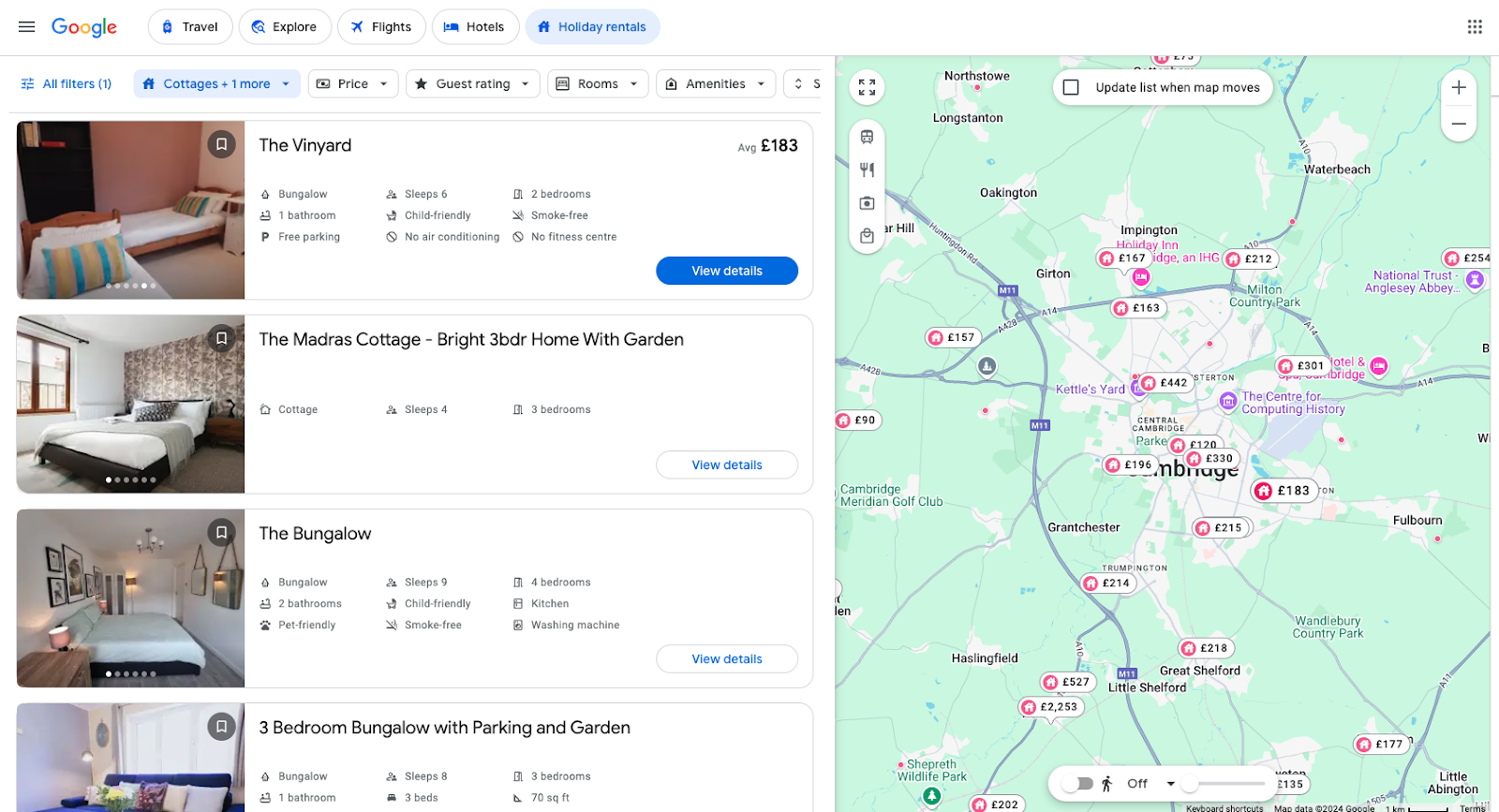
What sets Google Vacation Rentals apart is its seamless integration with the world's most popular search engine. This means that your property can appear in regular search results, map searches, and dedicated vacation rental searches, dramatically expanding your reach.
Google's entry into the vacation rental space is reshaping the industry landscape. By providing a centralised platform for travellers to compare options across multiple booking sites, Google is changing how guests discover and book accommodations. For property owners, this presents both a challenge and an opportunity to adapt and thrive in this evolving market.
Zero-commission direct bookings: the real financial hook
Here's the part most hosts miss: unlike OTAs, Google Vacation Rentals charges 0% commission. It acts as a search engine that redirects travellers to your direct booking website, allowing you to keep 100% of the revenue.
That changes the math on every booking. Instead of giving up 15% or more to Airbnb or Vrbo on every reservation, you capture the full nightly rate. And because the guest lands on your own site, you also keep:
- The guest's email address and contact details
- The customer relationship for future direct rebookings
- Control over the payment process and your own cancellation policies
- The ability to upsell experiences, early check-in, or extended stays directly
For a property doing $50,000 a year in bookings, eliminating a 15% OTA commission is worth $7,500 back in your pocket every single year.
Google Vacation Rentals vs Airbnb/Vrbo at a glance
| Feature | Google Vacation Rentals | Airbnb / Vrbo |
|---|---|---|
| Host commission | 0% | 3% – 15%+ |
| Guest service fee | $0 | Up to 14%+ |
| Who owns the guest data? | You (direct email access) | The OTA |
| Who processes payment? | You (via Stripe/PMS) | The OTA |
The trade-off is that you're responsible for the booking experience end-to-end — your direct booking site needs to convert, and you need a channel manager to keep your calendar synced. The rest of this guide walks through exactly how to set that up.
Eligibility criteria for listing on Google Vacation Rentals
Before you can list your property on Google Vacation Rentals, you'll need to ensure it meets the platform's eligibility criteria. Here's a detailed checklist to help you determine if your property qualifies:
Rental property checklist
- Property type
- Is the rental a self-contained living space (e.g., apartment, house, or villa)?
- Short-term availability
- Is the property available for short-term stays (typically less than 30 days)?
- Legal compliance
- Does the rental comply with all local laws and regulations regarding short-term rentals?
- Professional management
- Is the property professionally managed by you or a property management company?
- Online booking capability
- Can guests book the rental online through a Google-approved connectivity partner?
- High-quality listings
- Does the property listing include accurate and detailed information?
- Are there high-resolution photos?
- Is the availability and pricing up to date?
- Guest reviews
- Do you have positive guest reviews to enhance your listing's performance? (Not required to start.)
- Responsive communication
- Are you able to respond promptly to guest inquiries and booking requests?
- Cleanliness standards
- Does your property meet Google's cleanliness guidelines?
- Safety measures
- Are basic safety features in place, such as smoke detectors, fire extinguishers, and clearly marked exits?
By ensuring your property meets these criteria, you'll not only be eligible for Google Vacation Rentals but also well-positioned to provide a high-quality experience for your guests.
Preparing your property for listing
How to meet quality standards
Google maintains high standards for properties listed on its vacation rental platform. To ensure your property meets these standards, focus on the following areas:
Cleanliness and maintenance:
- Implement a thorough cleaning protocol between guests
- Regularly inspect and maintain all appliances and fixtures
- Keep outdoor areas well-groomed and tidy
Safety features:
- Install smoke detectors and carbon monoxide alarms
- Provide fire extinguishers in easily accessible locations
- Ensure all emergency exits are clearly marked
- Create an emergency information packet for guests
Guest satisfaction:
- Provide high-quality linens and towels
- Stock essential amenities like toiletries and kitchen supplies
- Offer clear check-in and check-out instructions
- Respond promptly to guest enquiries and concerns
Before listing your property, conduct a thorough assessment and make any necessary upgrades or improvements. This initial investment will pay off in better reviews and increased bookings.
How to create compelling property descriptions and photos
Your property listing is your chance to make a great first impression on potential guests. Here's a step-by-step guide to creating an irresistible listing:
- Summarise your property's best features in a concise, attention-grabbing title
- Example: "Stunning Seaside Cottage with Private Beach Access"
- Craft a detailed description:
- Start with a captivating opening that sets the scene
- Highlight unique selling points and nearby attractions
- Use descriptive language to help guests imagine their stay
- Break up text with bullet points for easy readability
- Take high-quality photos:
- Use natural lighting whenever possible
- Showcase all areas of the property, including outdoor spaces
- Capture details that make your property special
- Consider hiring a professional photographer for best results
- Tell your property's story:
- Share the history or inspiration behind your vacation rental
- Describe the guest experience from arrival to departure
- Highlight any personal touches or local connections
Remember, your goal is to help potential guests envision themselves enjoying your property. Use vivid, sensory language and let your passion for your rental shine through in your description.
Discover everything you need to know about how to market your short-term rental.
Choosing a Google-approved connectivity partner
To list your property on Google Vacation Rentals, you'll need to work with a Google-approved connectivity partner. These partners act as intermediaries, syncing your property data with Google's platform and managing the technical aspects of your listing.
A connectivity partner is a company that has met Google's requirements for data quality, reliability, and support. They provide the necessary technology to connect your property management system with Google Vacation Rentals.
Here's a comparison of some popular connectivity partners:
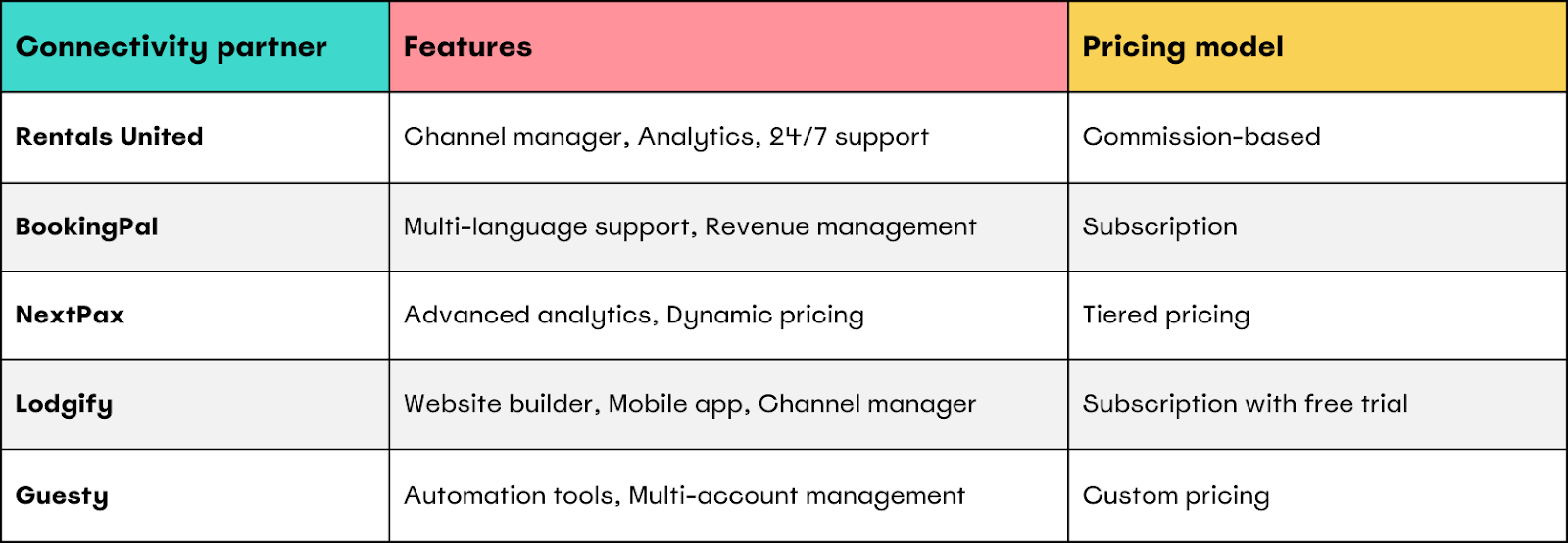
When selecting a partner, look for software that offers:
- Review aggregation — the ability to pull your existing Airbnb and Vrbo reviews into your Google listing. This is one of the highest-impact features you can get, because new direct listings start with zero reviews while your OTA listings may have hundreds. A partner that aggregates reviews lets you launch on Google with social proof already in place.
- Direct booking website integration so traffic from Google lands on a site you own and control.
- Real-time calendar and rate sync to prevent double-bookings across channels.
- Transparent pricing that aligns with your booking volume and margins.
- Quality customer support — ideally with onboarding help, since the initial Google setup is where most hosts get stuck.
- A solid reputation and reviews from other property owners in your size range.
Step-by-step guide to listing your property
Listing on Google Vacation Rentals breaks down into three concrete steps. Do them in order as skipping ahead causes the most common headaches.
Step 1: Build your direct booking site
Google sends traffic to your website, not to a Google-hosted listing. So before anything else, you need a direct booking site that can take a reservation. This usually comes bundled with your channel manager or PMS, but make sure it has:
- Clean, mobile-friendly property pages with strong photos
- An instant booking checkout (not just an inquiry form)
- Payment processing via Stripe or an equivalent processor
- Clearly displayed cancellation policies and house rules
If you don't have a direct booking site yet, this is the prerequisite — Google has nowhere to send guests without it.
Step 2: Choose a Google-certified channel manager
Pick a connectivity partner from the previous section, then register with them:
- Visit the partner's sign-up page
- Create an account with your business details
- Verify your email
- Complete your profile with property management details
Top tip: have your business documents ready — tax information and property ownership details — to streamline the registration.
Step 3: Map listings and sync to Google
Once you're set up with a channel manager, the software pushes your property feed to Google via API. You don't manually upload anything to Google itself. Inside your channel manager:
- Link your account to Google. Find the option to connect to Google Vacation Rentals in your partner's dashboard, then authorise the connection.
- Map your property data. Confirm descriptions, photos, pricing, availability calendar, amenities, and house rules are all accurate and complete.
- Submit for review. Double-check every required field, then push the listing live. Google typically takes a few days to validate and index new properties.
Top tip: use relevant keywords naturally throughout your property description — specific amenities, nearby attractions, and unique features guests might search for.
optimizing your Google Vacation Rental listing
While Google doesn't publicly disclose its exact ranking algorithm for vacation rentals, we can infer some key factors based on general SEO principles and industry best practices:
- Relevance: how well your listing matches the searcher's query
- Quality: the completeness and accuracy of your listing information
- Performance: your response rate, booking rate, and guest reviews
- Pricing: competitive rates for your property type and location
To optimize your listing, focus on these areas:
- Use relevant keywords in your property title and description
- Keep your calendar and pricing up-to-date at all times
- Encourage satisfied guests to leave positive reviews
- Monitor competitor pricing and adjust yours competitively
- Leverage local events and attractions in your description
- Maintain a high response rate to guest inquiries
- Regularly update your photos to keep your listing fresh
Set reminders to review and update your listing at least once a month. This regular maintenance will help ensure your property remains competitive in Google's search results.
Enhancing guest experience with Touch Stay digital guidebooks
One effective way to optimize your listing and improve guest satisfaction is by using a digital guidebook.

Touch Stay's digital guidebooks can be a game-changer for your Google Vacation Rental listing. Here's how:
- Improved listing quality: mention in your property description that you provide a comprehensive digital guidebook. This showcases your commitment to guest satisfaction and can make your listing stand out.
- Enhanced guest communication: include a link to a preview of your Touch Stay guidebook in your pre-arrival communications. This can help set expectations and build excitement for the stay.
- Better reviews: a well-crafted digital guidebook can lead to a smoother guest experience, potentially resulting in more positive reviews, which can boost your listing's performance on Google Vacation Rentals.
- Reduced workload: by answering common questions in your guidebook, you can reduce repetitive inquiries, improving your response rate and efficiency.
- Local expertise: use your Touch Stay guidebook to highlight local attractions, restaurants, and experiences. This local knowledge can make your listing more attractive to potential guests. Learn how to create the perfect Local Area Guide.
- Upselling opportunities: easily showcase additional services or experiences you offer in your guidebook, potentially increasing your revenue per booking.
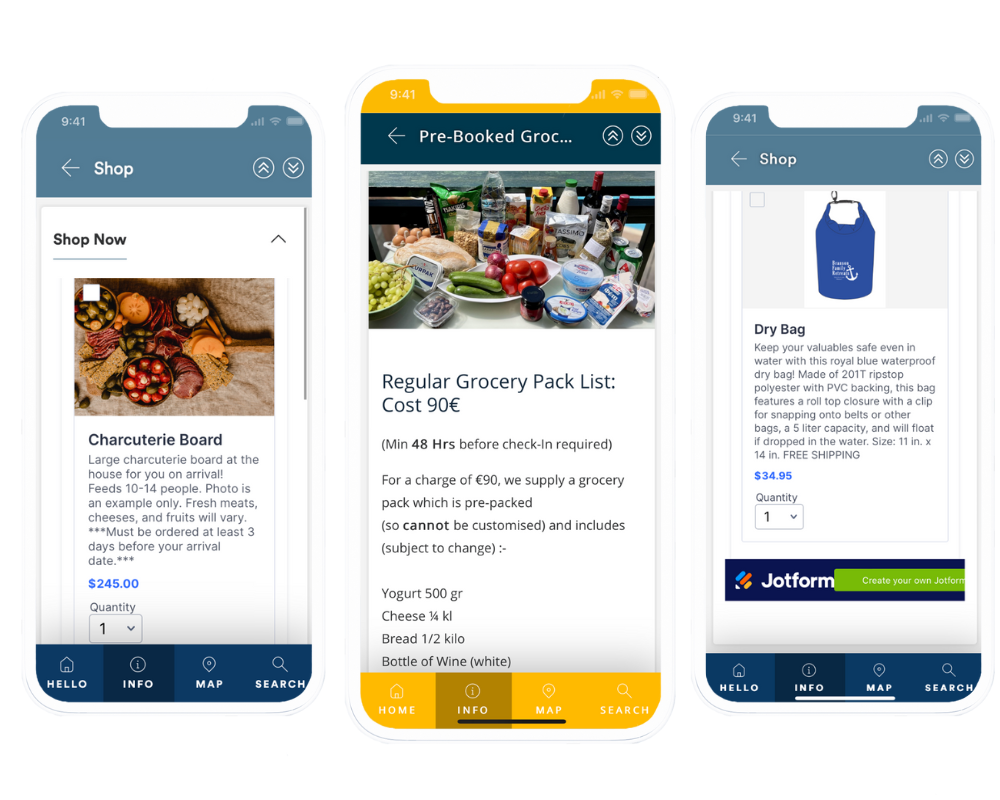
Remember to update your digital guidebook regularly with the latest information about your property and the local area. This ongoing effort can contribute to the overall quality and appeal of your Google Vacation Rental listing.
Managing bookings and guest communication
Google Vacation Rentals streamlines the booking and communication process:
- Instant booking confirmations: when a guest books through Google, you'll receive an immediate notification.
- Integrated messaging: communicate with guests directly through Google's platform.
- Cancellation management: handle cancellations and refunds according to your policies, which should be clearly stated in your listing.
To enhance your guest communication:
- Set up automated responses for common enquiries to improve response time
- Personalise your messages to create a welcoming atmosphere
- Provide clear, detailed information about check-in procedures and property access
- Be proactive in offering local recommendations and tips for enjoying the area
Remember, effective communication is key to positive reviews and repeat bookings. Strive to be responsive, helpful, and professional in all your interactions with guests.
Conclusion
Listing your property on Google Vacation Rentals can significantly boost your visibility and bookings in the competitive short-term rental market. By following this comprehensive guide, you'll be well-equipped to navigate the process of getting listed and optimizing your presence on this powerful platform.
Key steps to remember:
- Ensure your property meets Google's eligibility criteria
- Prepare your property to meet quality standards
- Create compelling descriptions and high-quality photos
- Choose a suitable Google-approved connectivity partner
- Register and sync your property data with Google
- optimize your listing for better visibility
- Manage bookings and guest communication effectively
As the vacation rental industry continues to evolve, staying ahead of trends and leveraging platforms like Google Vacation Rentals will be crucial for success. By embracing this opportunity, you're positioning your property for increased exposure and bookings in the growing digital travel marketplace.
Take action today to get your property listed on Google Vacation Rentals and tap into the vast potential of this powerful platform. Your next wave of happy guests could be just a Google search away!
Enhance your guest experience by adding a Touch Stay digital guidebook to their stay