

Summarize in
On November 20, 2026, Airbnb will start applying two updated policies. These wiill effect what you can ask guests to do, what information you can collect, and how you can use tools outside Airbnb, including digital guidebooks.
Can you still send Airbnb guests a guidebook? Yes. Check-in instructions, Wi-Fi details and local tips are exactly what guests need. You may just need to adjust a few settings and reword a few instructions.
The short version
- What's changing: house rules and requests must be reasonable and listed on Airbnb before booking. Hosts can't collect personal data, require registration to get in, or ask for reviews elsewhere, except in limited cases.
- Which bookings: reservations made on or after November 20, 2026, even if the stay is months away. Earlier bookings follow the previous policies.
- What to do: update your Airbnb listing first, then make sure your guidebook matches it.
- If you use Touch Stay: most of the setup happens in the OTA Compliance Centre. You keep one guidebook, and for Airbnb guests it hides marketing prompts, review invitations and the topics you choose.
We've broken down each of the following topics, so that you don't miss a thing:
- What's changing with Airbnb's November 2026 policies?
- New Airbnb house rules and checkout requirements
- Guest registration and personal data collection
- Third-party apps, rental agreements, and reviews
- Can you still use a digital Airbnb guidebook?
- How to prepare your Touch Stay guidebook
- Airbnb policy checklist for hosts
- Frequently asked questions
- Final thoughts
What's changing
Airbnb is updating two community policies:
- Reasonable house rules and requests outlines what you can ask guests to do during their stay and before checkout, including cleaning tasks and fines.
- Limiting host-imposed contracts and other requirements covers guest information, registration, third-party apps, rental agreements and reviews. It replaces the previous Off-Platform Policy.
Both apply to reservations booked on or after November 20, 2026. Bookings made before that date follow the previous policies, even if the guest arrives later.
Some of this isn't new. The previous policy already banned using guest contact details for marketing and asking for reviews on other websites, so it's worth reviewing your whole setup, not just the parts that changed.
The bigger picture
Look past the individual rules and there's a common thread. Guests should know what to expect before they book, get in without extra hoops, and spend the stay relaxing, not doing chores or filling in forms. That makes clear communication central to hosting.
House rules and checkout requests
Airbnb now separates house rules, which guests must follow, from requests, which guests are encouraged to follow.
There are seven standard house rules:
- Limits the number of people allowed to stay overnight in the home.
- Quiet hours: Specifies the time frames when noise must be kept to a minimum.
- Events: Indicates whether parties or events are permitted (disruptive gatherings are prohibited by Airbnb's Community Disturbance Policy).
- Pets: States whether pets are welcome and specifies how many are allowed.
- Smoking: Specifies whether smoking, vaping, or e-cigarettes are permitted.
- Commercial photography: Tells guests whether commercial photography and filming are allowed.
- Lock up at checkout: Requires guests to secure and lock up the home when leaving.
Everything else, like where to leave towels or how to sort recycling, is a request.
Everything must be in your listing
All house rules and requests must appear in the designated section of your Airbnb listing before guests book. You can't add new ones afterwards, whether by message, a sign in the home, in person or in your guidebook. Your guidebook can still remind guests of them, as long as it matches your listing.
Keep checkout requests light
Airbnb looks at the task itself, not how politely it's worded. Anything a cleaner would normally do should stay with your cleaner.
|
Avoid asking guests to |
Instead, ask them to |
|---|---|
|
Strip beds or start laundry |
Gather used towels |
|
Wash and put away dishes |
Place used dishes in the sink |
|
Take rubbish off the property |
Sort rubbish into the bins provided |
|
Avoid using an advertised amenity |
Turn off heating or air conditioning when leaving |
- Requests are optional. Wording like "Guests must" turns a request into a rule. A friendly reason works better: "so our team can get the home ready for the next guests".
- Locking up is the exception. It's a standard house rule, so guests are required to do it.
- Local context counts. Airbnb may accept requests that suit the area, such as animal-proof bins or shorter showers during drought restrictions. Explain the reason on your listing.
Don't restrict or charge for advertised amenities
If your listing advertises a hot tub, fireplace or barbecue, guests can use it. Any fee for an advertised feature must be included in the price guests see when they book. Optional extras that aren't advertised, like breakfast or a late checkout, are fine, and you can mention their fees in your requests.
No fines or penalties
Hosts generally can't impose their own fines. If a guest damages something, AirCover for Hosts is there to help. If a building, HOA or local authority could fine guests, you can say so on your listing.
You also can't cancel a booking because a guest skipped a request. Hand the task to your cleaner, and contact Airbnb if a house rule is broken.
Guest registration and personal data
With limited exceptions, hosts can't ask Airbnb guests for personal data at any point during the booking or stay. That includes:
- email addresses, phone numbers and home addresses
- passport, driving licence or other ID details, documents or photos
- card numbers, bank details and other financial information, except where Airbnb's payment policies allow it
- background checks or credit history
- biometric or health data, such as fingerprints or medical information
You can check a guest's ID in person at check-in, as long as your listing says so in the requests section. You can't keep a copy unless an exception applies.
When you can collect guest information
Only when you need to comply with the law or a documented community association rule, such as an HOA or building security requirement, or to sign a rental agreement Airbnb allows. If an exception applies, you must:
- Explain what's required, and why, in the requests section of your listing.
- Collect only what the law, rule or agreement calls for.
- Store it securely and delete it when you no longer need it.
Airbnb may ask you for evidence that the exception applies.
What about online check-in?
Online check-in is still possible when you have a permitted reason, such as a local law that requires guest registration. Without one, keeping it off is the safest choice. Optional registration is a grey area: Airbnb's policy doesn't mention optional forms, so it will depend on how Airbnb clarifies it. The Touch Stay steps below cover your options.
Apps, Wi-Fi, rental agreements and reviews
Apps and websites. Optional apps that make the stay easier, like smart home controls or concierge services, are fine. You can't require guests to register on a separate app or website to enter the property or use a critical amenity. Keyless entry apps that need registration are allowed, as long as you offer another way in if a guest asks.
Wi-Fi. No login portals that ask for an email address or other personal details, unless the listing is a hotel or resort or an exception applies. Share the network name and password instead.
Rental agreements. Generally not allowed. The exceptions are agreements that are:
- required by law or documented community association rules
- needed for an optional amenity, such as a golf cart rental
- for a stay of 28 nights or more
- for an Airbnb Luxe listing
If you use one, disclose its terms in the designated section of your listing before booking. Don't include personal information in it, because it's publicly visible.
Reviews. For most stays, you can't ask guests to review an Airbnb stay on another website, such as Google or Tripadvisor, or to fill in a survey about it elsewhere. Hotel listings are the exception. This includes rating and feedback forms inside your guidebook, because a digital guidebook is a separate website. For Airbnb guests, let the Airbnb review do that job.
Local recommendations. Recommend restaurants, tours and local businesses freely, as long as guests can ignore them. If you earn a referral fee or own the business, say so. Don't require or pressure guests to buy something unrelated to the stay, like a subscription or membership.
What happens if you don't comply
Airbnb says it starts with education and builds from there.
|
If the issue is… |
Airbnb may… |
|---|---|
|
House rules and requests |
Ask you to update your listing and issue warnings. If it continues, show a notice on your listing, rank it lower in search, or take other action. |
|
Personal data, required registration, contracts or reviews |
Issue warnings, and suspend or remove your listing. For repeat offences, suspend or remove your account. |
In other words, a checkout list or sign-up form you set up years ago could now affect how often your listing gets booked.
Can you still use a digital guidebook?
Yes. Airbnb's new policies don't stop you using a digital guidebook. In fact, a guidebook is one of the easiest ways to meet their spirit. Good guest communication is:
- Consistent: rules match across your listing, messages and guidebook.
- Easy to reach: arrival details open straight away, with no sign-up.
- Easy to find: check-in, Wi-Fi, checkout and emergency contacts are where guests expect them.
- Explained: each request comes with a short reason.
Here's what to do with each part of your guidebook for Airbnb guests:
|
In your guidebook |
For Airbnb guests |
|---|---|
|
Check-in and checkout instructions, Wi-Fi details, appliance guides, emergency contacts |
Keep. This is what a guidebook is for |
|
Local recommendations |
Keep. Disclose referral fees or ownership |
|
House rules and checkout requests |
Keep only what's on your listing, worded as light requests |
|
Notes that limit or charge for advertised amenities |
Update to match your listing |
|
Email sign-ups and newsletter invitations |
Hide |
|
"Book direct next time" offers |
Hide |
|
Review invitations for Google or Tripadvisor |
Turn off |
|
Ratings or feedback forms about the stay |
Turn off |
|
Online check-in and ID collection |
Off is safest. Optional, with ID off, is a grey area. Required only when the law or a documented rule asks for it |
|
Door codes behind a required check-in |
Don't, unless registration is legally required |
One rule covers most of it: your listing sets the rules, and your guidebook helps guests follow them.
How to set up Touch Stay for Airbnb guests
Touch Stay is built for this kind of guest experience:
- One link, no sign-up. Guests open their guidebook straight from an invitation link.
- Everything in one place. Check-in steps, house rules, Wi-Fi, appliance guides and local tips live together, not scattered across messages.
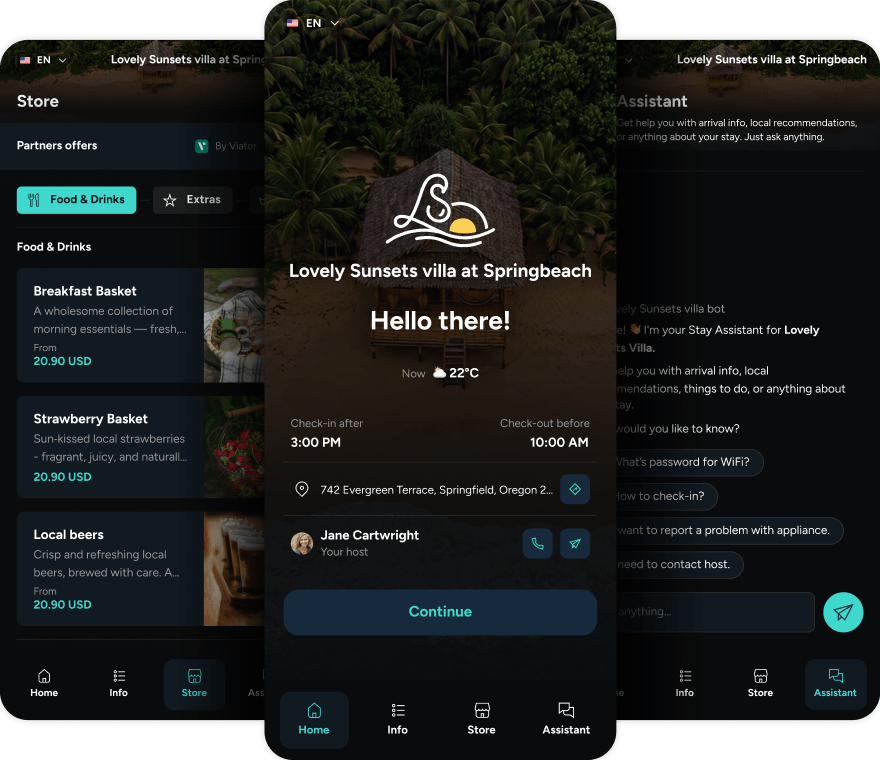
- The right version for each guest. With the OTA Compliance Centre, you keep one guidebook. For Airbnb guests, it hides marketing prompts, review invitations and the topics you choose.
Work through these steps before 20 November.
- Choose your Guest Registration setting. In Guidebook 2.0, you have three options. Off is the safest choice. Optional, with ID collection off, is a grey area: Airbnb's policy doesn't mention optional forms, so it will depend on how Airbnb clarifies it. Required is only for when local law or a documented rule, such as an HOA or building requirement, asks for it, with the reason stated in your Airbnb listing. Whichever you choose, check custom fields don't ask for health information, such as allergies.
-
- Required registration locks the guidebook until guests complete the form. Don't put door codes or key box details behind it unless registration is legally required.
- Registration can't be switched off for Airbnb guests only yet. Today, off means off for every guest using that guidebook. An OTA Compliance setting is coming that skips registration for Airbnb guests by default, and you'll be able to switch it off.
- Add Airbnb as a restricted booking source. Go to General settings → OTA Compliance Centre (in the legacy Hub: Settings → Preferences). Select Airbnb under Restricted booking sources, and add Other OTA if you use other platforms.
- Hide marketing consent. Under Marketing consent, select Hide for Email Capture, Rating, First Impressions and the Contact Collection pop-up. This hides the consent checkbox and saves contacts as not for marketing. It doesn't remove the email field itself, so also complete step 4. For Guest Registration, consent is hidden automatically for restricted sources when auto-hide is on (General settings → Guest data processing).
- Review the Contact Collection pop-up and feedback forms. The Contact Collection pop-up can't be switched off for Airbnb guests only yet. Today, off means off for every guest on that guidebook. An OTA Compliance setting is coming that skips it for Airbnb guests by default, and you'll be able to switch it off. For Email Capture, Rating and First Impressions, hide the topics that contain them for Airbnb guests (step 6).
- Disable external review invitations. Under External reviews, select Disabled. Airbnb guests who give a 4–5 star rating will no longer be invited to review you on Google.
- Hide sensitive topics. Use Hide sensitive topics to remove these for Airbnb guests:
- email capture forms and newsletter invitations
- direct booking promotions, discount codes or loyalty offers
- contact details meant for future bookings
- links to external registration or sign-up pages
- Check the Store and campaigns. Airbnb guests currently see your Store and published campaigns, because these can't be hidden by booking source yet. For now, unpublish any campaign that promotes booking direct. Every Store offer should be optional, shouldn't charge for anything advertised on your listing, and should be mentioned in your listing's requests.
- Share personal invitation links. Restrictions only apply when guests open the guidebook through a personal invitation link with the booking source set. Touch Stay's Airbnb integration sets this automatically, as do most PMS integrations. To check, go to Messaging & Chat → Invitations, open the three-dot menu in the table header, add the Booking Source column and save. Then check the booking source on each invitation, and watch for these cases:
- Mews doesn't send a booking source, so restrictions don't apply to those invitations.
- Manual invitations, and CSV uploads without a Booking Source column count as Manual, so no restrictions apply.
- Some PMSs send every OTA booking as Other OTA. If yours does, restricting Other OTA restricts all your OTA guests.
- The Quick Share link, and any QR code pointing to it, always shows the full guide. If you have printed QR codes in your property, make sure the full guide suits every guest, or points the codes somewhere else.
9. Test it as an Airbnb guest. Open your guidebook from an Airbnb guest's personal invitation link. Can they find everything without signing up? Do the rules match your listing? Is anything asking for information it shouldn't? A five-minute check now can save you a warning later.
Coming soon to Touch Stay
- Airbnb guests skip Guest Registration and the Contact Collection pop-up, on by default
- Hide the Store and campaigns by booking source
- Host contact details hidden on the expired-link page
- Guest Registration off by default for new Guidebook 2.0 setups
We'll update this article as each one goes live.
Direct bookings: where your full guidebook works hardest
The new rules apply to Airbnb guests. Guests who book directly with you can still see your full guidebook, so it's also a tool for building your direct business. For direct guests, you can keep these switched on:
- Email Capture and the Contact Collection pop-up, with marketing consent, so you can stay in touch with guests who opt in.
- Ratings and Google review invitations, so happy guests help new ones find you.
- Store and upsells, for extras guests can add to their stay.
- Return-stay offers, such as a discount code for their next booking.
The OTA Compliance Centre hides marketing prompts, review invitations and the topics you choose from Airbnb guests. The Store and published campaigns can't be hidden by booking source yet, so Airbnb guests currently see them too (see step 7).
One thing to avoid: don't use your Airbnb guests' guidebook to encourage them to book direct next time. Airbnb doesn't allow it, which is why step 6 hides those topics and step 7 unpublishes direct-booking campaigns for now. Grow direct bookings through your own website and the guests who already book with you.
Airbnb policy checklist for hosts
Your Airbnb listing
- All house rules and requests are in the designated section
- Checkout requests are light tasks, not cleaning jobs
- No fines or penalties, apart from notice of HOA or local authority fines
- Nothing restricts or charges extra for an advertised amenity
- Any required registration or ID check is explained, with the reason
- Any rental agreement fits one of Airbnb's four exceptions, and its terms are disclosed
Your guidebook and messages
- Rules and requests match your listing
- No requests for emails, phone numbers, ID or payment details
- No required sign-up to enter the property or use a key amenity
- No Wi-Fi portals that ask for an email
- No review invitations or feedback forms about the stay
- No "book direct" promotions
- Referral fees or ownership disclosed in recommendations
- Automated messages updated too
Your Touch Stay settings
- Guest Registration set to off, optional with ID off, or required only where the law or a documented rule asks
- Airbnb added as a restricted booking source
- Marketing consent set to Hide
- Contact Collection pop-up reviewed (it can't be switched off for Airbnb guests only yet), and feedback topics hidden
- External reviews set to Disabled
- Sensitive topics hidden, Store offers checked, and direct-booking campaigns unpublished
- Airbnb guests receive personal invitation links, with the booking source set
- Guidebook tested from an Airbnb guest's view
Frequently asked questions
Final thoughts
Airbnb's new policies point one way: simpler, more predictable stays. For hosts, that means a clear listing, light checkout requests, no personal data requests, and a guidebook that helps rather than asks.
Touch Stay puts everything in one link guests open without signing up, and the OTA Compliance Centre hides marketing prompts, review invitations and the topics you choose from Airbnb guests. For guests who book direct, your full guidebook helps you stay in touch and win repeat stays.
Already using Touch Stay? Open the OTA Compliance Centre and work through the steps above. If you'd like a hand, our team is happy to go through your setup with you.
New to Touch Stay? See how one guidebook can serve your Airbnb and direct guests, each with the right information.