

Summarize in
The questions often arrive before your guests do. Where should we park? How do we collect the keys? Is there somewhere nearby to eat when we arrive?
A digital welcome book gives those answers a home. Guests can open a link on their phone, find practical information and start planning their stay, without scrolling through a string of messages.
And you can now get started without a subscription fee. Touch Stay’s new Free Plan lets you create unlimited digital guidebooks, with no credit card required and no expiry date, so that you can streamline your vacation rental management and enhance the guest experience.
If you’re comparing digital welcome books for your Airbnb or vacation rental, here’s what to check before choosing one, and what you can do with Touch Stay’s Free Plan.
In this article, we’ll cover:
- What is a free digital welcome book?
- What should you look for in a free digital welcome book?
- What’s included in Touch Stay’s Free Plan?
- Is a free welcome book enough for your property?
- Get your first guide ready for guests
- Frequently asked questions
What is a free digital welcome book?
A digital welcome book is an online guide to your property and or local area. It brings together arrival instructions, Wi-Fi details, house rules, appliance information and recommendations in a user-friendly format guests can access from their phones.
“Free” can mean several different things. A downloadable template might be free to edit, while a guidebook platform might offer a temporary trial or an ongoing free plan with usage limits. Those options can suit different needs, so it helps to understand what you’re getting.
|
Option |
What you get |
What to check |
|---|---|---|
|
Free welcome-book template |
A starting layout for your property information |
How you’ll share it, update it and make it readable on a phone |
|
Free trial of a guidebook platform |
Temporary access to the software |
When the trial ends and what happens to your published guide |
|
Ongoing free digital guidebook plan |
Access without a subscription fee or fixed end date |
Monthly usage allowances, included features and any transaction fees |
If you mainly need help deciding what to write, our Airbnb welcome-book guide covers the essential sections and examples. This article focuses on choosing the right free option.
What should you look for in a free digital welcome book?
1. Information guests can find quickly
Your guidebook needs to work when a guest is standing outside the property with a suitcase, not just when you’re reviewing it on a laptop.
Look for clear navigation, readable text and useful photos. Give sections specific names such as “Parking” or “Using the heating” so guests know where to look. Open the guide on your own phone and try finding the checkout time without reading everything else first.
2. A straightforward way to share it
A link lets you send your welcome book before arrival. A QR code at the property gives guests another way to find it during their stay.
Check whether guests need an app or account, and whether the guide can be shared with people who booked through different channels. You want the information to be easy to reach, whichever booking platform brought them to you.
3. Updates that don’t create more work
The Wi-Fi password changes. Your favourite café closes. The coffee machine gets replaced.
Consider how you’ll keep the information current. With a downloaded PDF, guests may still have an older copy after you make changes. A web-based guide gives you a central place to maintain the information behind the link you share.
4. Space for your own hospitality
Practical details matter, but your recommendations help guests enjoy the place they’ve come to visit.
Look for room to add property photos, a personal welcome and useful local tips. Instead of listing ten restaurants without context, explain which one you’d choose for a late arrival, a family lunch or a special evening out.
5. Limits that fit how you’ll use it
An unlimited number of guidebooks doesn’t necessarily mean unlimited guest usage.
Check the monthly view allowance, messaging limits, chatbot allowance and number of people who can manage the account. If you plan to sell extras, check the fees on orders too.
Think about how often guests may revisit the guide. A monthly view allowance should not be treated as a count of bookings or unique guests. Understanding the limits upfront helps you decide whether a free plan is a useful starting point for your property.
What’s included in Touch Stay’s Free Plan?
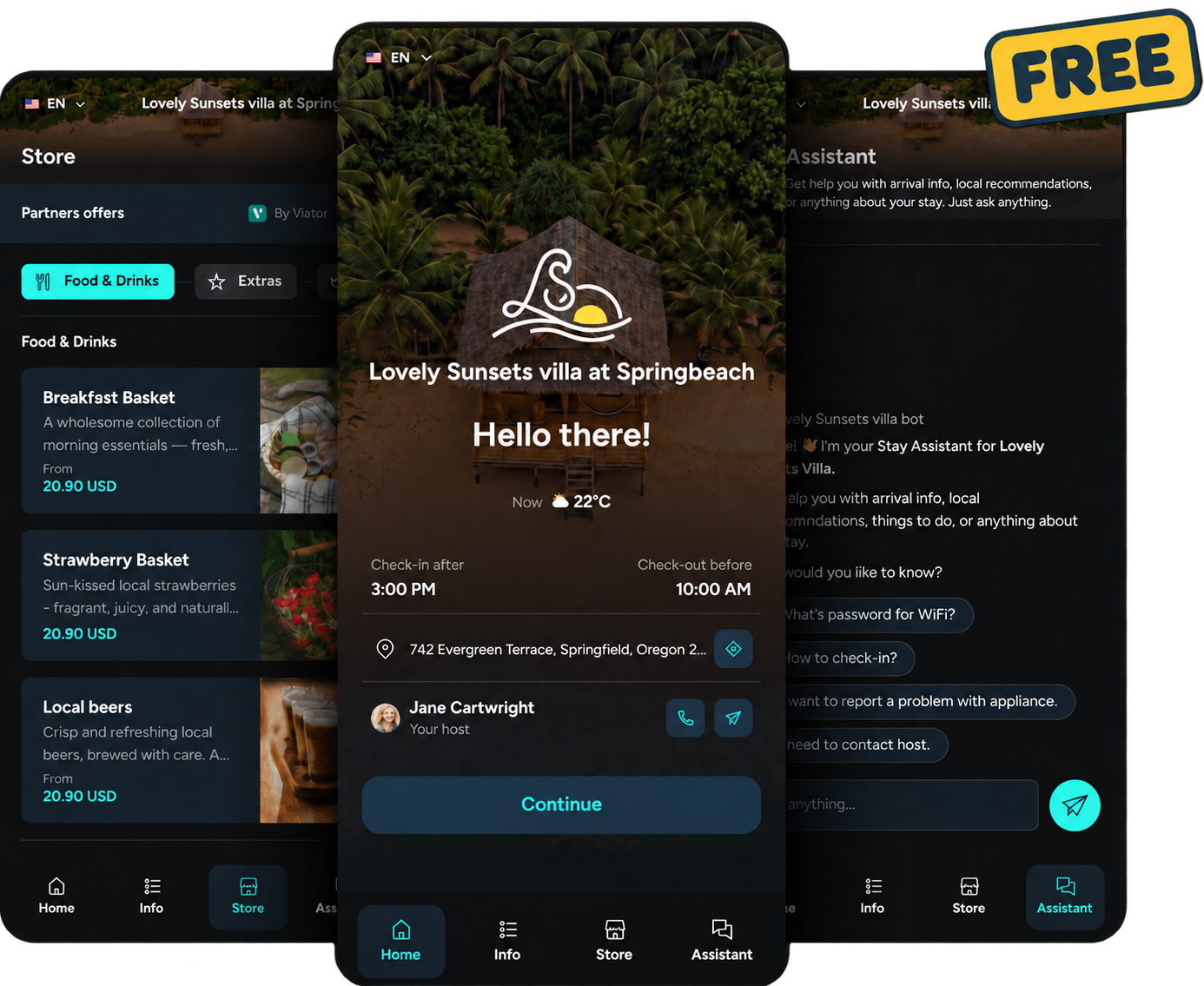
Touch Stay’s Free Plan gives you a way to start using digital guidebooks without a subscription fee. You can create as many guidebooks as you like, organise your property information and share it with guests.
You can use it to:
- Put practical answers in one place. Add check-in instructions, parking, Wi-Fi details, house rules and checkout information.
- Make the guide your own. Include your branding, photos, welcome message and local recommendations.
- Share it with guests. Use a guidebook link or QR code, with guest invitations and scheduled emails available within the plan’s limits.
- Try the AI Chatbot. Let guests ask common questions, subject to the Free Plan’s usage allowance.
- Offer extras through your Guest Store. Introduce options such as early check-in, late checkout or local experiences, where available and appropriate for your property.
The Free Plan limits at a glance
|
Item |
Free Plan |
|---|---|
|
Subscription price |
$0 per month, with no expiry date |
|
Guidebooks |
Unlimited |
|
Guest views |
20 per guidebook per month |
|
Team seats |
1 |
|
Touch Stay fee on Store orders |
5% |
|
Scheduled emails and AI Chatbot |
Included with monthly usage limits |
|
Timelines, Data Dashboard and custom domains |
Not included |
The Free Plan has no end date, but guest access is subject to its usage limits. A guidebook is paused if it reaches 150% of its monthly view limit, until the next monthly reset or an upgrade. Check your Billing page for your allowances and usage.
The 5% Store fee is separate from the subscription price. Free guidebook access does not mean that selling extras is fee-free.
Is a free welcome book enough for your property?
A free plan can be a useful way to organise your information, build your first guide and see how digital guest communication fits your hosting routine.
Start with the questions you answer most often. Add clear instructions, check the guide on a phone and keep improving the information as you notice gaps.
If you need higher usage allowances, more team access or features such as Timelines and the Data Dashboard, compare the paid plans before relying on those capabilities. The right choice depends on your guest activity and workflow, not simply how many guides you can create.
Get your first guide ready for guests
You don’t need to write an entire destination guide before getting started. Gather your arrival message, Wi-Fi details, house rules, checkout instructions and a handful of personal recommendations.
Add them to your guidebook, check that the information is accurate and preview the guest experience. Then share the link before your next arrival, with a short explanation of what guests will find inside.
For a fuller content checklist, use our guide to creating an Airbnb welcome book.
No credit card required. No expiry date. Monthly usage limits apply.
Frequently asked questions about digital guidebooks