

Summarize in
Table of contents
- What a short-term rental guidebook does
- The case for one guidebook across Airbnb, VRBO, and direct bookings
- What goes in a short-term rental guidebook
- Multi-property guidebooks: a portfolio approach for PMs
- Live example: a working STR guidebook
- Build your own vs use Touch Stay
- Frequently asked questions
What a short-term rental guidebook does
A vacation rental guidebook is the single place your guest goes to find out how the door works, when the bins go out, which beach is worth the drive, and what to do when the boiler makes that noise. Not a PDF they lose in their inbox. Not a laminated binder on the kitchen counter that three people have spilled wine on. A link they open on their phone, before they arrive and every day they're with you.
If you run one property, you can get away with improvising. You answer the same six questions by message, you send the same directions, and it costs you an hour a week. If you run twelve, or forty, the improvising is the job. And the guidebook stops being a nice touch and starts being the operational layer that keeps your inbox quiet.
The bigger issue is that your guests aren't all arriving from the same place. Some booked on Airbnb. Some on VRBO. Some came through Booking.com, and the ones you've worked hardest for booked direct. Each of those channels has its own messaging rules, its own arrival flow, and its own limits on what you're allowed to send. Your guest doesn't care about any of that. They want the wifi password.
.png?width=1080&height=1080&name=Bohemian%20bungalow%20(4).png)
A guidebook that lives outside the booking platforms solves that, because it's one link you can send through any channel, and one set of content you update once.
The case for one guidebook across Airbnb, VRBO, and direct bookings
Most managers we talk to didn't decide to run three parallel guest comms systems. It happened to them.
It usually goes like this. You start on Airbnb, and you write your house manual into Airbnb's built-in field. Then you list on VRBO, and because that field doesn't travel, you copy and paste it into VRBO's version. Then you add Booking.com, whose messaging is stricter, so you paste the essentials into your check-in email instead. Then you launch direct bookings, and now you need a fourth version because none of the platform tools work for guests who never touched a platform.
Four copies of the same content. Four places to update when the gate code changes.
The cost shows up in three ways, and none of them appear on an invoice.
Drift. The moment you have more than one copy, they start disagreeing. The Airbnb version says check-in is 4pm because you changed it last spring. The VRBO version still says 3pm. Somebody arrives at 3pm.
Update tax. Every change gets multiplied by the number of copies and then again by the number of properties. A new parking rule across twenty units held in three platform fields each is sixty edits. Realistically it's sixty edits you don't make, so the content quietly goes stale instead.
Dead ends. Platform message threads close after checkout. Guidebook content living inside them disappears exactly when you'd want it working for you, which is the window where a happy guest becomes a repeat direct booking.
One guidebook, one canonical version, delivered by whichever route each booking came in on. Change the gate code once and every guest across every channel sees the new one.
What goes in a short-term rental guidebook (10 sections, customisable by property)
You already know the basics belong in there. The better question is what earns its place and what simply buries the information guests need.
Ten sections cover almost every property type. For a broader checklist of what belongs in an online welcome book, see Touch Stay's online welcome book guide. Treat the first four as non-negotiable and the rest as property-dependent.
1. Arrival and access. Address, what the building looks like from the street, parking, door code or key handover, and what to do if the code fails at 11pm. Photos beat paragraphs here. A picture of the front door removes an entire category of message.
2. Wifi and connectivity. Network name and password, on their own, near the top, in text they can copy. Mobile signal quality if it's poor, because managing that expectation up front prevents a review that mentions it.
3. House rules, framed as hospitality. Quiet hours, smoking, pets, extra guests, parties. The content is boring and mandatory; the tone is a choice. "Our neighbours are lovely and light sleepers, so we keep things quiet after 10pm" lands better than a list of prohibitions and does the same job.
4. Checkout. Time, what you want stripped or started or locked, where the keys go. Ambiguity here costs your cleaner twenty minutes per turnover.
5. Appliance and system how-tos. The oven that needs a specific setting, the shower that runs cold for thirty seconds, the heating controller nobody can decode. This section can save the most support time, yet it is often skipped.
6. Troubleshooting and emergencies. Fuse box location, water shut-off, what to do about a tripped RCD, your out-of-hours number and when to use it. Guests will hunt for this at the worst possible moment, so make it findable.
7. Local food and drink. Not twenty options. Six to eight places you'd actually send a friend, with a line each on why and roughly what it costs. Curation is the value; a directory dump is not.
8. Things to do, sorted by conditions. Split it by weather and by trip type. "If it rains" and "with kids" are the two filters guests apply in their heads anyway.
9. Getting around. Parking specifics, transit basics, taxi and rideshare availability, distance to the nearest shop, and whether a car is genuinely needed.
10. Contact and next steps. How to reach you, expected response time, and, for direct-booking operators, a clear route to book again without a platform in the middle.
Two structural notes for anyone running more than a handful of units. First, sections 1 through 6 are property-specific and sections 7 through 9 are usually area-specific, which means they can be shared across every unit in a location and maintained once. Second, order matters more than completeness. Guests scan. Anything below the third scroll is functionally invisible on arrival day, so front-load access, wifi, and checkout.
Multi-property guidebooks: a portfolio approach for PMs
This is where multi-property operators can make the biggest time savings.
The principle is simple: template once, customise per unit. Split the content into three layers:
The brand layer. Your logo, colours, tone, contact details, policies, and your booking-again message. Identical across every property. Set it once and it should propagate.
The area layer. Restaurants, attractions, transport, beaches, hospitals, the good coffee. Shared by every unit in the same town or neighbourhood. Maintained once and reused across ten, twenty, or a hundred guidebooks. If you manage across three cities, you have three area layers, not sixty.
The unit layer. Access, wifi, appliance quirks, parking bay number, bin day, the specific dishwasher. Genuinely unique per property, and typically the only part that needs writing when a new unit comes on.
Structured this way, onboarding a property stops being a content project and becomes a form. Touch Stay's property manager guidebooks use the same portfolio-first approach. Touch Stay users report getting a new unit live in under ten minutes, because nine tenths of the guidebook already exists and only the unit layer is blank.
The same structure fixes the reverse problem, which is portfolio-wide updates. A new damage-waiver policy, a rebrand, a change to your out-of-hours number: edit the layer, not the properties. Bulk edit tools mean one change lands everywhere instead of becoming forty tickets nobody has time for.
A few portfolio details are worth planning for:
- Owner-branded units. If you manage for owners who want their own identity, keep the area layer shared and let the brand layer vary per unit.
- Language. Guidebooks that serve inbound international guests need to render in the guest's own language rather than making them paste your text into a translator. Touch Stay guidebooks display in over 30 languages on any device. See the property-manager guidebooks for the portfolio workflow.
- Delivery. With 40+ integrations across PMS and channel manager tools, the guidebook link can go out automatically on booking or a set number of days before arrival, so nobody on your team is sending links by hand.
- Analytics. At portfolio scale, guest activity can also show where a property has recurring problems. Twelve people a week opening "how does the heating work" at the same building is a maintenance signal, not a content one.
Live example: a working STR guidebook
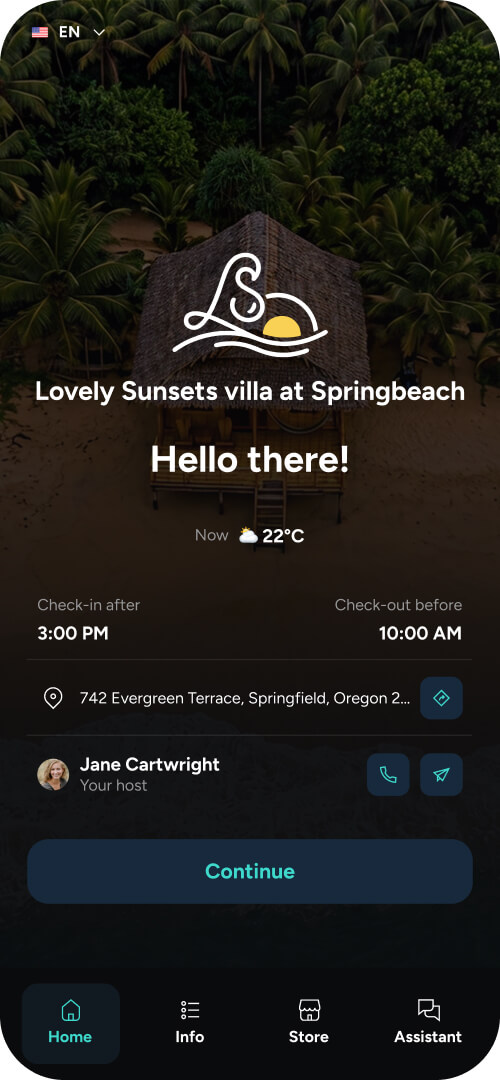
Descriptions of guidebooks are less useful than one you can open, so start with Touch Stay's example guidebooks and the property-manager guidebooks.
Three things to notice about them.
It opens in a browser. There's no app to download, no account for the guest to create, and no password beyond the link itself. Every step you add between the message and the content loses you a percentage of guests, and an app install loses you most of them.
It's built for a phone held in one hand in a doorway. Sections collapse, the important things sit at the top, and the content is scannable rather than read.
It also works offline once loaded, which matters when a guest has poor signal at the door. The moment a guest most needs the door code is often the moment they're standing outside a building with one bar of signal.
Build your own vs use Touch Stay
Building it yourself is a legitimate option, and for one property it's often the right one. The maths changes with scale, so here it is honestly. If you're comparing the wider tech stack, see our guide to short-term rental management software.
|
Build your own |
Touch Stay |
|
|---|---|---|
|
Initial build |
A weekend or so per property for a decent web page or Notion doc |
Hours for the first, then minutes per unit |
|
Adding a unit |
Duplicate and edit everything by hand |
Apply the template, fill the unit layer |
|
Portfolio-wide change |
Edit every property individually |
Edit once, applies across units |
|
Languages |
Manual translation per language per property |
30+ languages rendered automatically |
|
Delivery |
You or your team send links manually |
Automated via PMS, email or SMS |
|
Offline use |
Usually not |
Yes, once loaded |
|
Guest data |
None unless you build it |
What guests open, and contact capture |
|
Ongoing cost |
Your time, compounding with each unit |
Subscription, scaling with property count |
The practical answer: at one or two properties the build-your-own route costs you a weekend and works fine. Somewhere around five units, the maintenance load crosses over, because the work isn't creating guidebooks, it's keeping them all true at the same time. If you can't change one fact across your whole portfolio in a single edit, you'll eventually stop changing it.
Frequently asked questions