.png?width=50)
Summarize in
Self-Check-In for Vacation Rentals: What 3,822 Guest Questions Reveal About What Goes Wrong
Most self-check-in guides walk you through the setup, but neglect to tell you where it breaks. We analyzed 37,359 real guest chatbot conversations to find out.
Table of contents
- What self-check-in actually is
- The three self-check-in methods, ranked by what we see go wrong
- What our data shows about where self-check-in fails
- The three questions guests ask most before check-in works
- What to put in your guidebook so the questions stop
- The backup plan most hosts forget
- Setting up Airbnb self-check-in (the steps that actually matter)
- The honest take on which method is best for you
What self-check-in actually is
Self-check-in lets a guest enter your property without you being there to meet them. They use one of three access methods — a lockbox, a smart lock, or a fob or key from building staff — and the whole arrival happens without a handoff. Done well, it's the single biggest convenience upgrade a vacation rental can offer. Done badly, it's the fastest way to start a stay with a guest standing in your driveway texting "I can't get in."
The three self-check-in methods, ranked by what we see go wrong
There are three access methods worth taking seriously for short-term rentals. Each fails differently, and the failure pattern is what should drive your choice.
Lockbox. A small wall-mounted or hanging box with a combination dial or keypad. Guest enters the code, retrieves a physical key, opens the door. Cheapest option, around $20–60.
How it fails: code shared incorrectly, dial jams, key gets stuck inside, key gets lost mid-stay, codes don't reset between guests, lockbox freezes shut in winter.
Smart lock or keypad. Replaces or augments your existing lock with a digital keypad. Guest enters a unique code; no physical key changes hands. $150–400 upfront.
How it fails: battery dies, internet drops (for the connected models), code wasn't pushed to the device on time, guest enters the code wrong three times and gets locked out, code doesn't expire when you wanted it to.
Fob, key, or concierge access. Front desk, building manager, or a hidden key location. Common in apartments and condo buildings.
How it fails: concierge isn't there at 11pm, guest doesn't speak the same language as the desk staff, key isn't where you said it would be, guest accidentally takes the fob home with them.
There is no failure-free option. The right question isn't "which method is bulletproof" but "which method's failure mode am I best prepared to handle, and what do I put in writing so it almost never happens?"
What our data shows about where self-check-in fails
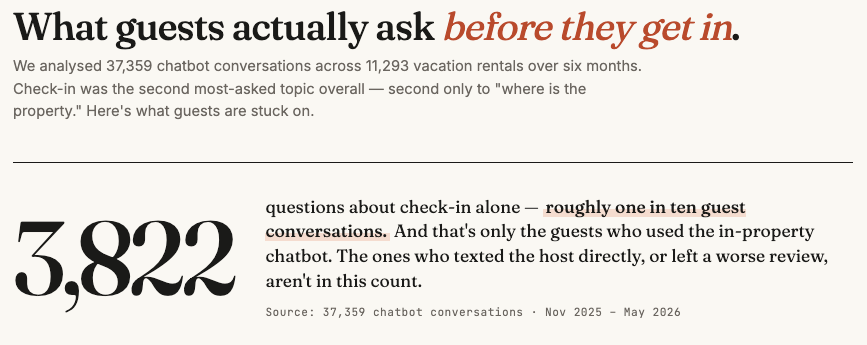
We analyzed 37,359 guest chatbot conversations across active vacation rentals over six months. Check-in was the second most-asked topic overall — 3,822 questions about check-in alone, second only to location/directions.
Roughly one in ten guest conversations is a check-in question — and those are just the ones where the guest used the in-property chatbot. The number who texted the host directly, or simply got frustrated and left a worse review, is higher.
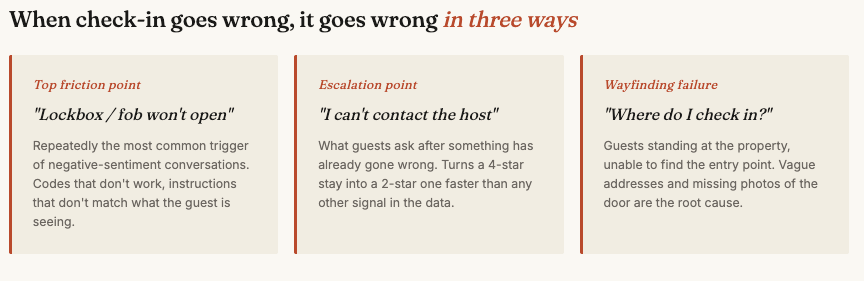
When we looked at which check-in questions came in with negative sentiment attached, three patterns dominated:
- "Lockbox / fob won't open" — repeatedly the top friction point in negative-sentiment conversations
- "I can't contact the host" — what guests ask when something has already gone wrong
- "Where do I check in?" — guests at the property unable to find the entry point
Guests aren't struggling with the idea of entering a property without meeting the host. They're struggling with execution — codes that don't work, instructions that don't match what they're seeing, no fallback when something fails.
That's the actual problem to solve. The Airbnb setup steps are five minutes of clicking. The execution is everything. Building a clear, mobile-friendly home for that execution is what a good digital welcome book is for.
The three questions guests ask most before check-in works
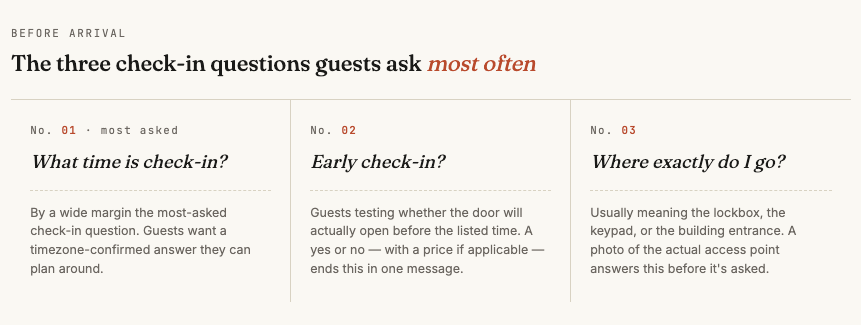
From the same dataset, the three exact check-in questions that came up most often:
- "What time is check-in?" — by a wide margin, the most-asked check-in question
- "Early check-in?" — guests testing whether the door will open before the listed time
- "Where exactly do I go?" — usually meaning the lockbox, the keypad, or the building entrance
If these aren't answered before the guest arrives, they will be asked. And if they're asked while the guest is standing outside with luggage, you've already lost the early hours of the stay to friction.
The good news: all three are preventable with one page of clear written instructions and one well-shot photo.
The bad news: most hosts write check-in instructions assuming the guest is reading them somewhere comfortable in advance, when in reality the guest reads them while standing on a porch in the rain.
Write your check-in instructions for that moment — porch, rain, luggage, dropped pin not loading. Our list of the most common FAQs to put in a welcome book covers more of the questions hosts get asked again and again.
What to put in your guidebook so the questions stop
Based on what guests actually ask, a check-in section that ends most questions before they start contains:
- Exact arrival time, with timezone. "Check-in is from 3pm local time."
- A photo of the access point. The lockbox itself, the keypad, the door. Not a stock image — the actual one, at the actual property, in daylight.
- The address with a What3Words or Google Maps pin link. Vague street addresses are a real-world failure point in rural and complex urban properties.
- Parking instructions, if relevant. Where to park, what permit (if any), where not to park.
- The exact entry sequence. "Walk to the green door on the side of the building. The lockbox is mounted at waist height to the right. Code: 1234. Turn the dial slowly, then pull down to open."
- What to do if it doesn't work. A backup phone number, a secondary access method, or a clear escalation path.
- WiFi password, mentioned at check-in not in a separate section. The number one question in our entire dataset — across 37,359 conversations — was about WiFi, and guests ask within minutes of arrival.
The pattern across high-friction stays we see: hosts assume too much and write too little. The fix isn't writing more, it's writing specifically. Replace "the lockbox is by the door" with "the lockbox is mounted at waist height on the right side of the green door, about two steps after you walk up the porch."
If you're starting from scratch and want a structure to follow, our guest welcome book template walks through what to include section by section.
The backup plan most hosts forget
Across the negative-sentiment data, one signal repeats: "I can't contact the host."
This is the failure mode that turns a 4-star stay into a 2-star one, not the broken lockbox itself.
Three things to have in place before any guest ever uses your self-check-in:
- A secondary access method. Even if you have a smart lock, install a lockbox with a physical key. Even if you have a lockbox, give a trusted neighbor a key.
- Two contact methods for you, both prominent. Phone and one of: WhatsApp, iMessage, or platform messaging. Don't bury them at the bottom of a long welcome message.
- A printed emergency contact card inside the property. A small laminated card on the kitchen counter with your number, the property address, the WiFi, and the nearest emergency services. When guests are already inside but something goes wrong on day two, this is the page they look for.
Self-check-in works when the guest doesn't need to think about it. The backup plan is what saves you when they have to.
Setting up Airbnb self-check-in (the steps that actually matter)
Once your access method and your written instructions are sorted, the Airbnb side is fast:
- Go to your listing on Airbnb.com and select the property.
- Click Edit next to Info for Guests.
- Click Arrival details under Guest Manual.
- Pick how guests will access the property — lockbox, smart lock, keypad, or building staff.
- Fill in the check-in instructions field with the exact entry sequence from the section above.
A note about Airbnb's default messaging: Airbnb sends check-in instructions to the guest 48 hours before arrival. Two days is a long time for a message to get buried under other travel emails.
The hosts we see having the smoothest arrivals send their own check-in message the day before, or the morning of, regardless of Airbnb's automatic timing. Don't rely on a message from two days ago to be the first thing the guest looks at when they arrive — especially when a digital guidebook gives the guest a persistent home for the information they can return to whenever they need it.
The honest take on which method is best for you
Most articles in this category give you a "best for beginners" answer that's really a guess. Based on what we see fail and not fail in our data, here's a more honest version:
- If you're starting out and the property is in mild weather, a lockbox is fine. Cheap, low-tech, easy to fix. Replace the key inside between every stay.
- If you're scaling beyond one or two properties, get smart locks. The operational cost of resetting lockbox codes and chasing lost keys is real. Smart locks also reduce the "I can't contact the host" failures because the code is generated automatically, tied to the booking, and expires on time.
- If you're in a doorman building, use the building's system but back it up. Building staff turn over, schedules change, and 24/7 isn't always 24/7. Always have a secondary access method written into your guidebook.
- Avoid the meet-and-greet "hybrid." Either you're doing self-check-in or you're not. "Self-check-in available but please message when you arrive" is the worst of both — guests don't know whether to wait, and you don't know whether to come.
Self-check-in is an upgrade for most hosts, but only if you treat it as a system: clear written instructions, a reliable access method, a real backup plan, and a contact path that actually works. The setup takes an afternoon. The system pays for itself in better reviews, fewer 11pm phone calls, and the small but real share of guests who book because of it.
For inspiration on how to present check-in details inside a guide your guests will actually use, browse digital guidebook examples from real hosts.